Service and AI
The right conversation, with AI and with people.
WhatsApp and site chat in the same inbox. The AI answers what it knows, drafts the reply for your team and hands over when a decision is needed.
From the One plan up. Official WhatsApp from Meta, WhatsApp by QR and site chat, in the same inbox.
Agent studio
Four pieces, an agent that sounds like you.
You build the agent with no code. Each piece fits into the next, and the live test shows the answer before you publish.
Listens
Choose where the conversation arrives: the store's WhatsApp, the site chat or your API.
Knows
Give it instructions, your tone of voice and what it checks before answering.
Acts
Turn on the tools: hand over to the team, tag the conversation, save the contact.
Answers
Test it as if you were the customer, publish and roll back to an earlier version whenever you want.
Copilot for your team
The AI writes. The person decides.
In suggestion mode, the agent drafts the reply inside the conversation. Your team sends, edits or discards it.
- The AI never sends on its own in this mode
- Ask for a suggestion at any time
- Each channel picks its mode
Customers and loyalty
Who orders orders again.
The customer account on your site, the customer list in the panel, loyalty and a review for every order. The data belongs to the store.
The customer signs in with no password
On your site, the customer signs in with a code sent by email. The account keeps addresses, favorites and orders, with one-tap reorder.
The customer list in the panel
Search and filters, with the orders and loyalty of each customer.
The open customer
Orders, addresses and the loyalty balance. Exporting and deleting customer data stay with the admin.
Stamp card or cashback
You pick the mode and the rule shows as a sentence while you adjust. The panel shows who is close to earning.
The customer reviews the order
The rating and comment for the order and the courier reach the panel right away, and the store replies. The review stays between the customer and the store.
The store decides the program
Stamp card or cashback, how many stamps, what the reward is and whether it shows in the customer account: all in the panel.
Loyalty and reviews are new features: they join your rollout when they are in the proposal.
New
What is new in the agent.
Three new features of the agent, and what each one does.
- New
Closes the order in the chat
Builds the bag with size, flavors and crust, checks the total on the server and creates the order.
- New
Understands audio
A voice message becomes text for the agent and for your team.
- New
Several agents
One for orders, one for after-sales, one for the abandoned bag.
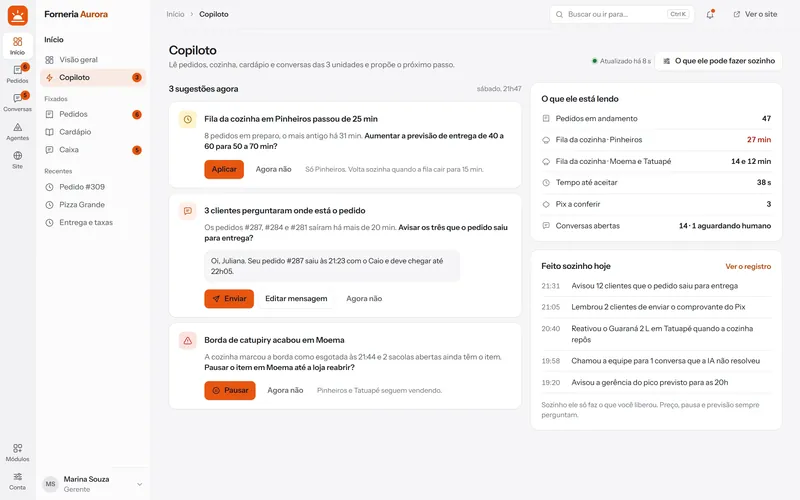
Operations copilotNew
A copilot that reads the queue and proposes the next move.
The copilot reads orders, kitchen, menu and conversations and proposes an action. You apply it in one tap, and decide what it may do alone.
- The queue is running late: it proposes a longer delivery estimate
- Customers ask about their order: it drafts the update for you to send
- An item ran out: it proposes pausing it until the kitchen restocks
- Everything it does goes on the record
Live today: the agent copilot, which suggests the reply inside the conversation.
Questions
About service and AI.
Does the AI answer anything?
No. It answers with what you gave it: instructions, store data, the menu and site pages. Beyond that, it hands over to the team.
Does the AI close the order on its own?
It is a new feature of the platform: the agent builds the bag, checks the total and creates the order in the chat. In the places running today, the agent answers questions, checks the menu and opening hours and hands over to the team.
Do I need the official WhatsApp?
Your choice. The official Meta channel is the one we recommend for critical operations. The QR connection is simpler, unofficial and carries a risk of the number being blocked, explained before you turn it on.
Who pays for the AI?
Model usage is billed to your own account with the provider, with the key saved in the panel and a spending limit you set.
See it running, with your place in mind.
One conversation with a person from Kadelta. You see the panel, the site and the service inbox, and leave with the next steps.
See a demo