Orders and operations
The order on the move, from site to doorstep.
Queue, kitchen, counter, delivery and payment in the same panel. The order comes in through the site and nobody types it again.
No commission per order.
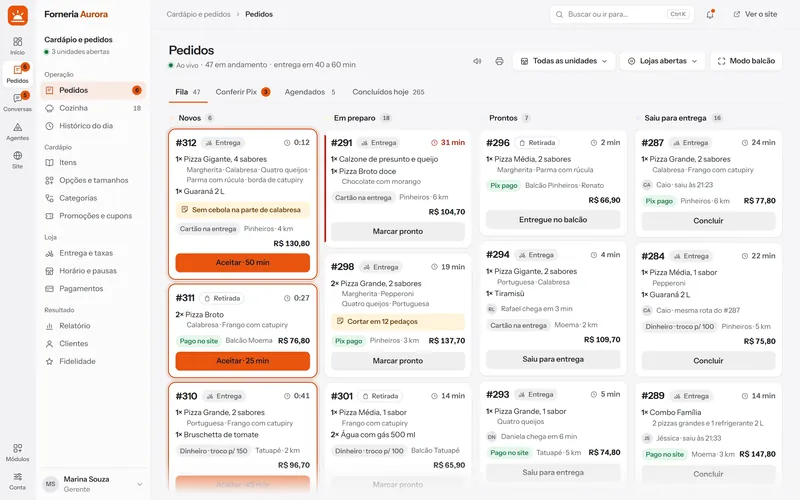
The path of an order
Five states, a screen for each one.
From the new-order alert to the delivery. Each step has the right screen, and the customer follows along on the site.
Arrived
A new order plays a sound on any panel screen and on the team's phones.
Accepted
One tap accepts. The customer pays on delivery or by Pix, with a QR code or a receipt. Online payment comes with automatic settlement.
In the kitchen
The kitchen sees the card with items and notes. The ticket prints from the browser, on 80 mm paper.
Out with the courier
The fee came from the distance, with the pin confirmed on the map. The courier sees the delivery on their own phone and opens the route. The customer follows the status and gets the delivery code.
Delivered
The courier types the code the customer reads on the order page and the delivery closes. What was collected at the door goes into the shift cash register.
Couriers
The courier, on their own phone.
For your own courier, with no app to install. They enter through the shift access, see the deliveries, finish with the customer's code, and the store follows everything from the panel.
From the panel to the door, on three screens
The store assigns the order, the courier leaves and finishes with the code, and the customer follows on the order page. What was collected at the door goes into the cash register at settlement.
Enters with the shift QR
The store opens the access in the panel and shows the QR, or sends the link. The courier gets in with no password and no app to install.
Sees the deliveries
The shift list shows the departure order, the neighborhood and how much to collect at each door.
Opens the route and knows what to collect
The open delivery shows the address, the button that opens the route in the phone's map, the amount to collect and the change.
Finishes with the code
The customer reads 4 digits on the order page and the courier types them. Customer absent and not delivered have their own buttons, with a reason.
The store watches live
In the panel: who is on the street, the status of each delivery and the incidents. Back at the store, the courier settlement goes into the cash register.
The store decides how it works
Turn it on or off, require the code, how many deliveries per run and how long to wait at the door: all in the panel.
The courier map is new and each store decides whether to turn it on. Sending depends on the courier screen being open on their phone; without it, the customer still sees the delivery status and the code.
Cash register
The shift cash register, checked at the end.
Each person opens, moves and closes their own shift. A completed order enters by itself, and closing compares what was counted with what was expected.
Opens with the float
Whoever is serving opens the shift and says how much was in the drawer.
Every order enters by itself
A completed order becomes an entry, split by payment method. Nobody types it again.
Cash in and cash out, with a reason
Adding cash and removing cash ask for the reason and stay under the name of who did it. The courier settlement lands here too.
Closes by counting the drawer
You count first and the expected amount shows after. If it matches, the register checks out. If not, the difference asks for a justification and stays under your name.
The sales day closes with it
The daily report adds up the shifts by payment method, checks the entries against the orders and exports to CSV.
The store sets the rules
Blind count, counting by banknote and the difference that needs approval from an admin.
The cash register is not a fiscal tool: the platform does not issue invoices.
Menu and pricing
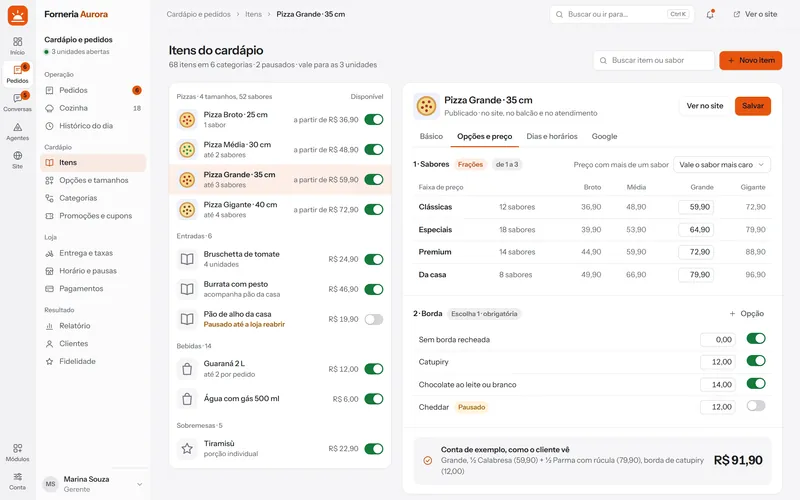
The menu is yours. So is the pricing rule.
Categories, sizes, flavors, crusts and extras in option groups. On a pizza with several flavors, you choose how to charge and the server redoes the math.
- Works for pizza, burgers, açaí and lunch boxes
- Coupons and promotions with an end date
- Change the price and the site follows
Pricing engine for split pizzas
- By the most expensive flavorthe R$ 66.00 half countsR$ 66.00
- Proportional to each part29.00 + 33.00R$ 62.00
- Sum of the partshalf price + half priceR$ 64.00
- Fixed price per sizelarge, any flavorR$ 60.00
Overview
The day at a glance, with first-party analytics.
The overview shows what needs you first, and the path from site to order with no third-party cookies.
- Orders per hour, with the peak in plain sight
- Visits, menu opened, bag and order
- Where each visit came from
New
What is new in operations.
New features of the platform. They join your rollout when they are in the proposal.
- New
Online payment
Mercado Pago, PayPal and direct with the bank, settled automatically.
- New
Courier on the map
The position of the courier on the way, on the order page.
- New
Scheduling and reports
Orders for a set time and sales by day, item and neighborhood.
Questions
About orders and operations.
Do I need a computer in the kitchen?
No. The panel runs in the browser: a tablet, a phone or a TV with a small computer will do.
Does it work with my printer?
The ticket prints from the browser, on 80 mm paper. We test it with your printer during rollout, before going live.
Can customers pay online?
The customer pays on delivery (cash, card machine or meal voucher) or by Pix, with a QR code or a receipt. Online payment, through Mercado Pago, PayPal and direct with the bank, is new on the platform: it settles automatically, and it joins when it is in the proposal.
Do you charge per order?
No. There is no commission per order, and the money goes straight to your account.
Does the courier need to install an app?
No. They enter with the shift QR or link, in the phone browser, with no password. They see the deliveries, open the route and finish with the 4-digit delivery code the customer reads on the order page.
How does the cash register work?
Each person opens the shift with the float. A completed order enters by itself by payment method, cash in and cash out ask for a reason, and the courier settlement goes into the register. At closing you count the drawer and any difference asks for a justification. The cash register does not issue invoices.
See it running, with your place in mind.
One conversation with a person from Kadelta. You see the panel, the site and the service inbox, and leave with the next steps.
See a demo