Demo
See the platform running.
Tell us how you sell today. In 30 minutes you see the back office, the website and the inbox, with a person from Kadelta.
- 30 minutes, on video
- No strings attached
- A custom proposal after the call
Rather talk now? Open the chat on this website: whoever replies is the same service you will be using.
What to expect
What happens in the demo.
Three steps, no sales script.
You tell us
How you sell today, how many locations you run and what gets in the way.
We show you
The back office, the website and AI customer service running, on what matters to your place.
You receive
A custom proposal with scope, setup schedule and the monthly fee.
The back office
The whole operation on one screen.
From the order coming in to the plate going out. Every area was designed for the dinner rush.
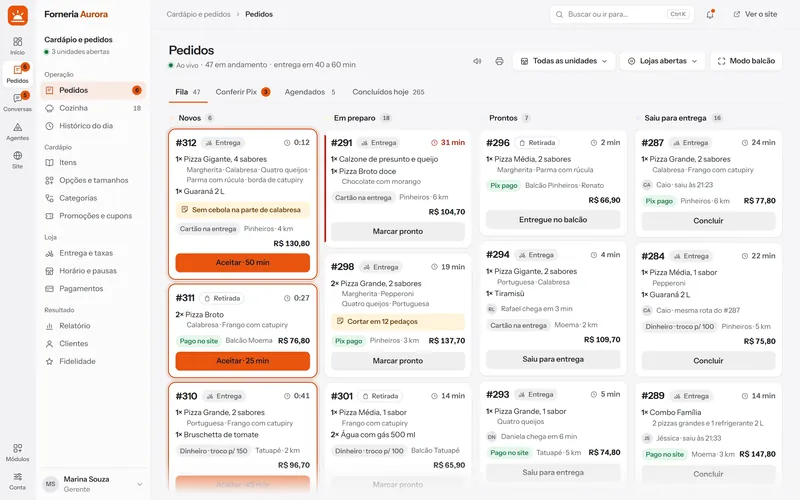
Today's queue, from new to delivered
A new order rings on any screen of the back office. One tap accepts it, another sends it to the kitchen.
- Delivery and counter in the same queue
- Tickets printed from the browser
- Pix by QR code or receipt
The kitchen screen, no lost tickets
Each order becomes a card with its items and notes, in the order it came in.
- Items and notes up front
- Pause a sold-out item in one tap
- Move the order forward without leaving the screen

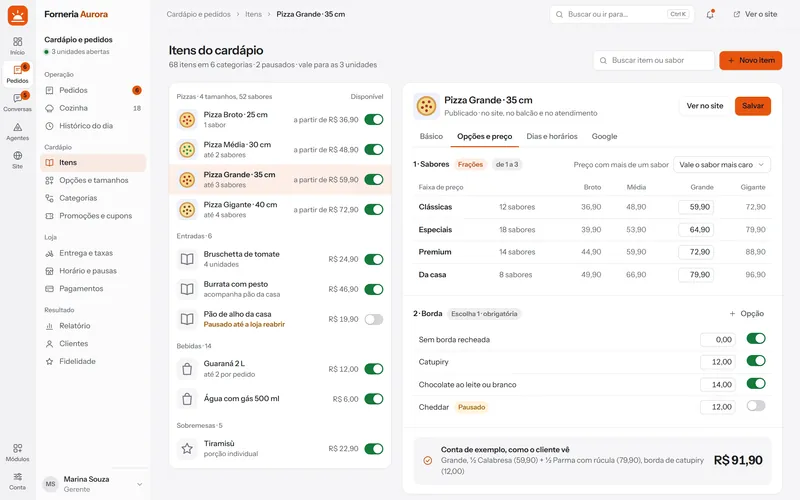
Menu, prices and promotions, in your hands
Categories, sizes, flavors, crusts and add-ons. Change a price and the website changes with it.
- Option groups for any product
- Coupons and promotions
- Delivery fee by distance, with a map
The day at a glance
From website to order: how many visited, opened the menu and added to the bag. First-party analytics, no third-party cookies.
- What needs you comes first
- Where each visit came from
- Alerts on your team's phones
